
How to Play Squigdle — Controls, Rules & Ink Strategy
Learn the complete 6-step Squigdle daily loop—how to drag and spin the red, blue, and green squiggles, pace limited ink with no undo, and install the web app on iOS or Android.
Drag and spin the daily red, blue, and green squiggles into a recognizable layout, draw connecting black-ink lines without running out of ink (no undo), name your doodle, submit your single daily entry, vote on three random creations, and return the next day to see your rank.
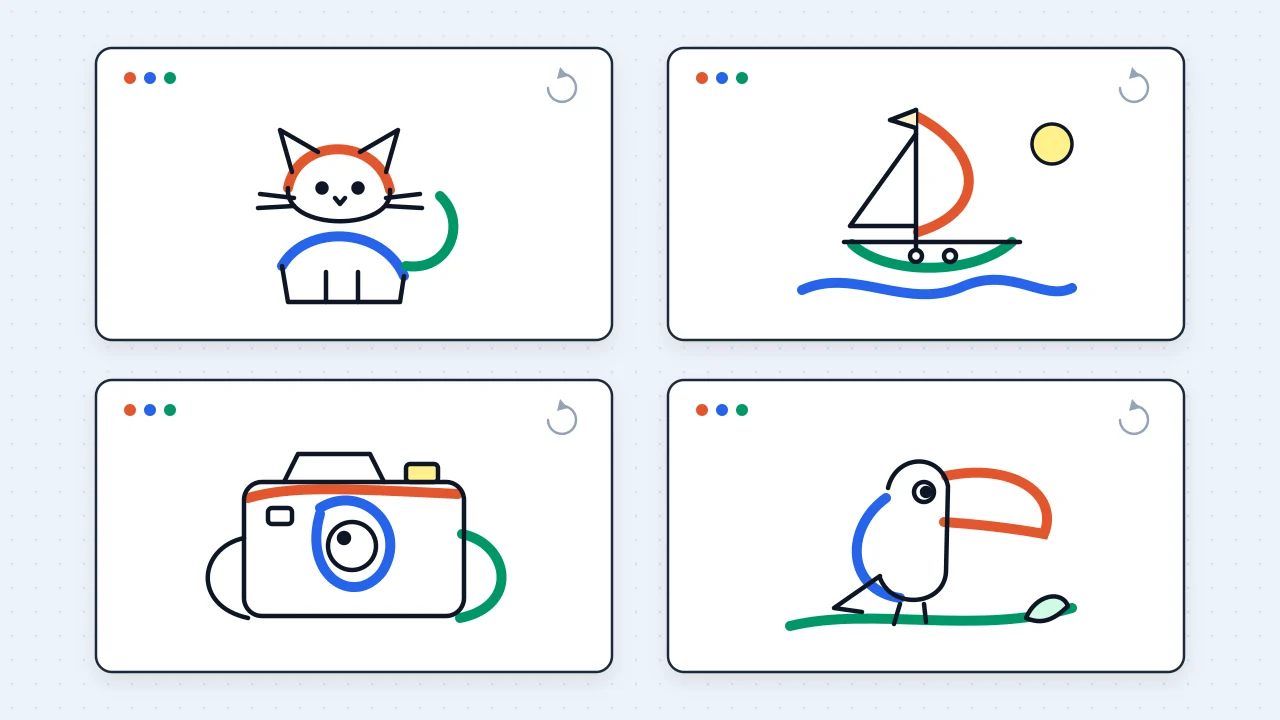
Step-by-Step Squigdle Gameplay Walkthrough
Every player who opens Squigdle on the same day receives the exact same puzzle seed: one red squiggle, one blue squiggle, and one green squiggle resting on a blank page. Your job is to transform those three abstract marks into a single cohesive picture before submitting it to the daily voting gallery.
Phase 1: Drag and Spin the Three Squiggles
Before drawing a single black line, spend 30 to 60 seconds purely rearranging the colored shapes. You can drag each squiggle anywhere across the canvas and spin (rotate) it to any angle. Most beginners rush straight into sketching while leaving the three squiggles in their default horizontal spread—which almost always forces awkward filler lines and drains the ink meter early.
Instead, test three quick spatial combinations during the arrange step:
- Cluster two squiggles together: Overlapping or nesting two curves immediately creates eyes, wheels, wings, waves, or speech bubbles while letting the third squiggle anchor the foreground or background.
- Flip vertical and diagonal: A flat bump looks like a dull hill until you rotate it 90 degrees—suddenly it becomes a toucan beak, a coffee mug handle, a crescent moon, or a saxophone bell.
- Leave breathing room around the edges: Keep your arrangement centered with clean margin space so your final silhouette reads cleanly when scaled down into a 3-way voting thumbnail.
Phase 2: Draw Around, Through, and Between the Squiggles
Once your layout clicks, draw black ink lines around, through, and between the three colored strokes to tie them into one recognizable subject. Two signature constraints define how Squigdle feels:
- Limited Ink: A visible ink meter tracks every millimeter you draw. Long meandering outlines and heavy shading burn through your allowance quickly. Plan your essential contours first (head, eyes, horizon, main silhouette) and spend leftover ink on one charming detail like steam curls, glasses, or motion lines.
- No Undo Button: Every stroke is permanent. There is no eraser and no Ctrl+Z. Drawing slightly slower with intentional short strokes gives you cleaner corners than trying to outline an entire character in one frantic loop.
Phase 3: Name Your Creation
After finishing your sketch, write a short, crisp title. Your title appears right beneath your doodle during voting and recap showcases. Strong titles clarify clever visual puns without over-explaining—think "Morning Commute" or "Overqualified Duck" rather than a full paragraph. Remember that moderation checks both the drawing and the title text, so keep wording clean and free of personal handles or links.
Phase 4: Vote, Share, and Redraw for Fun
Submitting locks in your one official entry per day. Immediately afterward, Squigdle invites you to vote by picking your favorite out of three random creations made by other players from the same day's squiggles. You can also share your drawing directly with friends.
If another hilarious concept hits you five minutes after submitting, official Squigdle lets you redraw in your sketchbook for fun, and you can also switch to our Squigdle Practice Sketchbook anytime for unlimited shuffled seeds.
Controls & Platform Reference
| Action | Desktop (Mouse / Trackpad) | Mobile & Tablet (Touch / Stylus) |
|---|---|---|
| Move a squiggle | Click and drag the colored squiggle | Press and drag with one finger or stylus |
| Spin a squiggle | Drag the rotation control to turn any angle | Spin using the on-screen rotate handle |
| Draw ink lines | Hold primary click and sketch smoothly | Draw directly on the canvas with finger or pen |
| Undo a mistake | Disabled in official daily rules | Disabled in official daily rules |
| Install as full-screen app | Browser bookmark / PWA install icon | iPhone Safari: Share → Add to Home Screen; Android Chrome: Menu → Install app |
How to Install Squigdle on Your Home Screen
Squigdle does not require an App Store or Google Play download—it is designed as an installable web app that launches full-screen straight from your home screen:
- iOS (iPhone & iPad): Open
squigdle.comin Safari, tap the Share button at the bottom of the screen, scroll down, and tap Add to Home Screen. - Android (Chrome): Open
squigdle.comin Chrome, tap the three-dot browser menu in the upper-right corner, and tap Install app.
Playing in full-screen mode hides browser address bars and reduces accidental page scrolling while drawing fine details.
Next Steps After Your First Doodle
Once you feel comfortable with drag-and-spin placement and ink pacing, read our Squigdle Voting & Top 50 Ranking Guide to see how 3-way matchups score entries, or explore Squigdle Drawing Tips & Creative Ideas for repeatable composition patterns that stand out in voting.
Frequently Asked Questions
What are the basic steps to play Squigdle?
Every day all players get the same three colored squiggles (red, blue, and green), drag and spin them into place, draw with limited ink and no undo, give the picture a title, and vote on three random creations made by other players.
Can I reset and submit a second official drawing on the same day?
No. Official Squigdle limits you to one ranked entry per day so every player competes fairly in the daily voting pool. However, you can redraw in your sketchbook for fun or warm up with unlimited practice seeds on Squigdle Wiki.
Is there a Squigdle mobile app?
Yes. You can add Squigdle directly to your iPhone Home Screen via Safari Share → Add to Home Screen, or tap Install app in Chrome on Android, giving you a full-screen drawing canvas with zero app store download.
How do I avoid running out of ink in Squigdle?
Spend extra time arranging and spinning the three squiggles closer together before drawing. Grouping the colored shapes naturally shrinks the gaps you need to bridge with black ink, letting simple bold outlines carry the whole picture.